Custom Checkout

Fully branded checkout pages built for your business

Create custom checkout flows with your branding, custom fields, and seamless Stripe integration. Enhance customer satisfaction and conversion rates, all PCI compliant.

Full Branding ControlStripe IntegrationPCI Compliant
Key Features

Everything you need for custom checkout

Flexible customisation options with no complex integrations required.

Custom Branding

Upload your logo, set brand colours, and customise fonts. Every checkout page looks and feels like your own website, not a generic payment form.

Custom Data Fields

Define custom fields to collect the exact data you need from customers. Add text fields, dropdowns, or checkboxes alongside standard payment fields.

Payment Rules Engine

Set minimum and maximum amounts, require specific fields, or restrict payment methods by product type. Configure shipping charges and delivery options.

Template Cloning

Create a checkout page once, then clone and adapt it for different products or campaigns. Roll out new payment pages in minutes, not days.

Stripe Integration

Payments process securely through Stripe with full PCI DSS Level 1 compliance. Card data never touches your servers. Paytia handles everything.

Multi-Channel Distribution

Share payment links through email, SMS, social media, or embed directly on your website. Each page gets its own trackable link for reporting.

How It Works

Create your checkout in 5 simple steps

Paytia's checkout service control system puts you in complete control of your payment experience.

1

Create data capture fields

Define custom fields to collect the exact data you need from customers alongside their payment details.

2

Configure payment method

Set up your payment gateway connection, choose supported card types, and configure payment processing rules.

3

Manage shipping options

Optionally set up delivery charges, shipping methods, and address collection if your checkout requires it.

4

Create checkout template

Design your branded payment page using the point-and-click builder. Add your logo, colours, and layout preferences.

5

Set payment rules

Configure minimum and maximum amounts, expiry dates, and any business logic that controls how your checkout behaves.

Benefits

Why businesses choose Paytia for checkout

Ease of Use

Creating and sharing payment links is straightforward, requiring just a few clicks. Customers appreciate the simplicity, making it easier for them to complete transactions quickly and securely.

Customisable Payment Pages

Tailor the payment page to reflect your brand, creating a consistent and professional experience. Add your logo, colours, and custom messaging to reinforce brand identity.

Secure Transactions

All payment links direct customers to a 3D-secure, PCI DSS-compliant payment page, ensuring sensitive information is always protected and building customer trust.

Link Expiry Settings

Set specific expiry times for payment links to add security and create urgency for customers to complete payments promptly.

Secure Code Verification

Use Paytia Secure Code to build customer trust by providing a verification code that confirms the legitimacy of payment links and reduces phishing risk.

Branded Email Templates

Add your company logo to Paytia email templates and send emails from your own domain for a professional, branded appearance that reinforces customer recognition.

Use Cases

Custom checkout for every business type

Event Ticketing

Collect attendee details, ticket type preferences, and dietary requirements alongside payment in a single branded form.

Professional Services

Invoice clients with custom reference fields, project codes, and service descriptions. Collect payment and data together.

Membership Organisations

Process subscription fees with membership tier selection, renewal dates, and member information capture.

E-Commerce

Create product-specific checkout pages with quantity selectors, shipping options, and promotional code fields.

Security and Trust

Built-in security that builds customer confidence

Every checkout page includes enterprise-grade security features that protect your customers and reduce fraud risk.

Paytia Secure Code

Each payment link includes a unique verification code that customers can use to confirm the legitimacy of the checkout page. Reduces phishing risk and builds trust.

Link Expiry Settings

Set specific expiry times for payment links to add security and create urgency for customers to complete payments promptly. Expired links cannot be used.

3D Secure Integration

All card payments are processed through 3D Secure authentication, adding an extra layer of verification and reducing chargeback risk.

PCI DSS Level 1

Card data is captured in a Paytia-hosted iframe and sent directly to the payment gateway. Your servers never see, store, or transmit card details.

Branded Email Templates

Add your company logo to Paytia email templates and send emails from your own domain for a professional, branded appearance that reinforces customer recognition.

Fraud Detection

Real-time BIN checks, LUHN validation, and card type controls ensure only legitimate payments are processed through your checkout pages.

Templates

Fully customisable templates

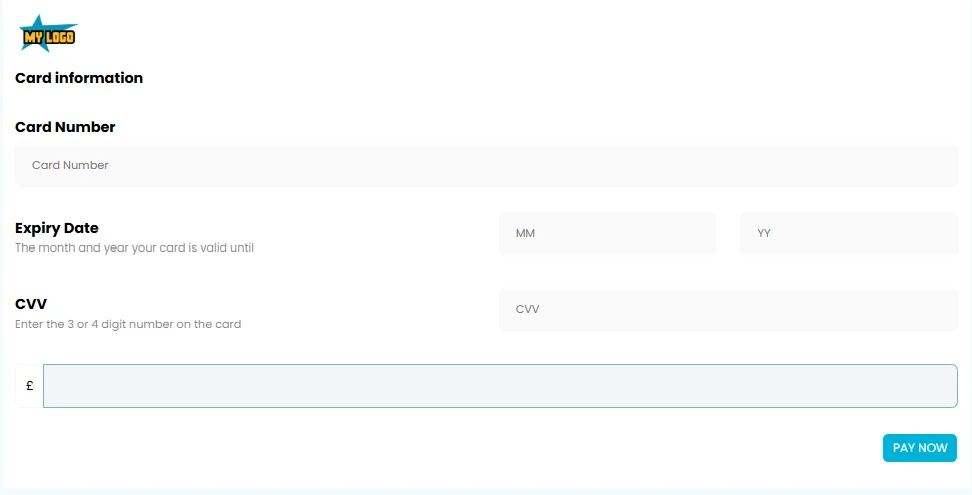
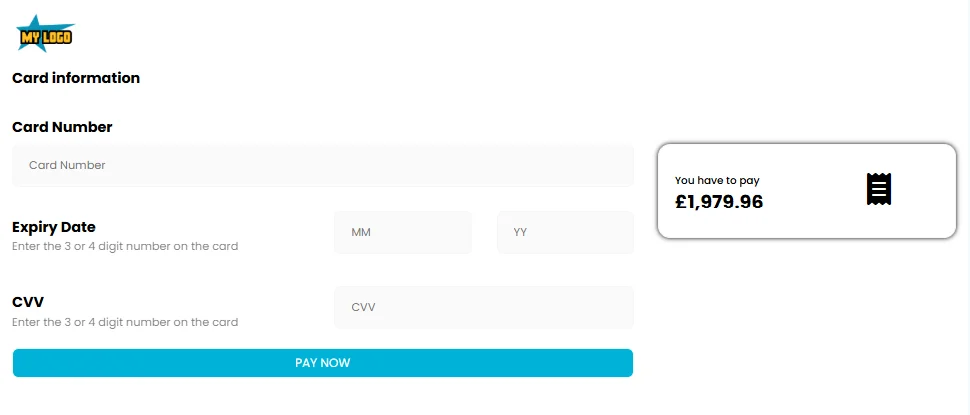
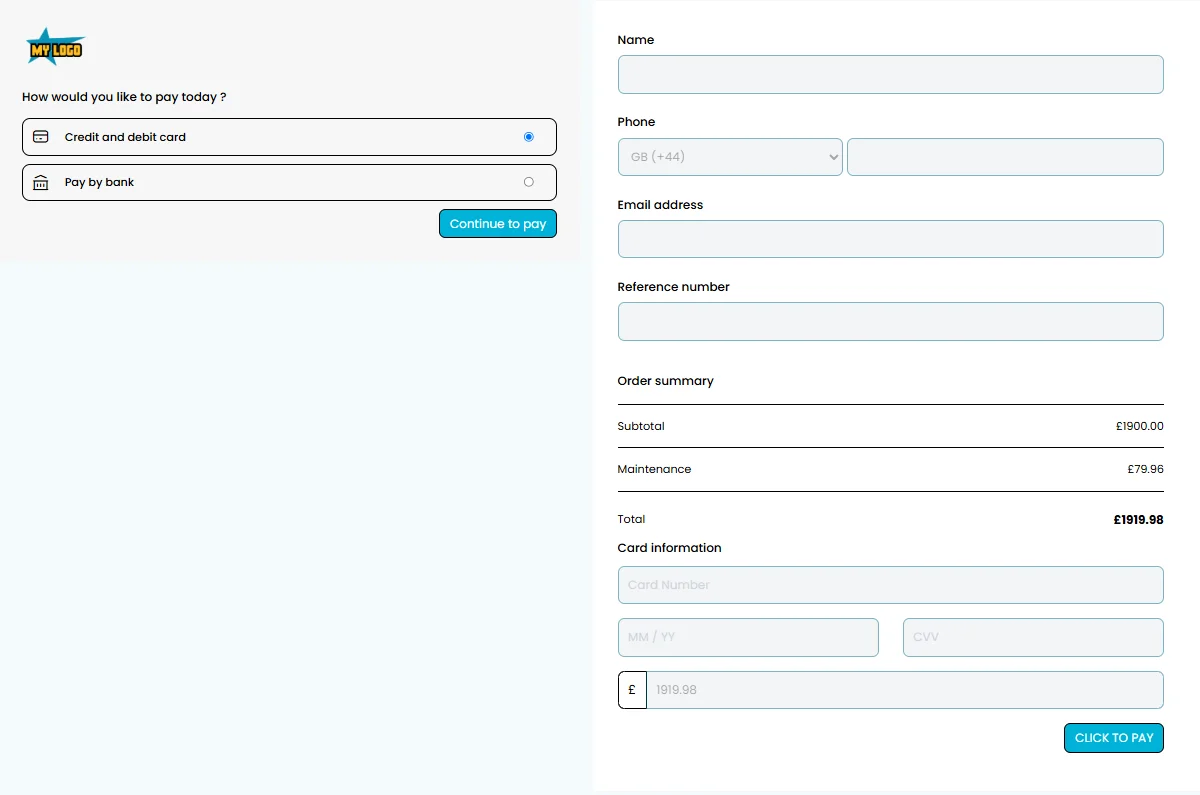
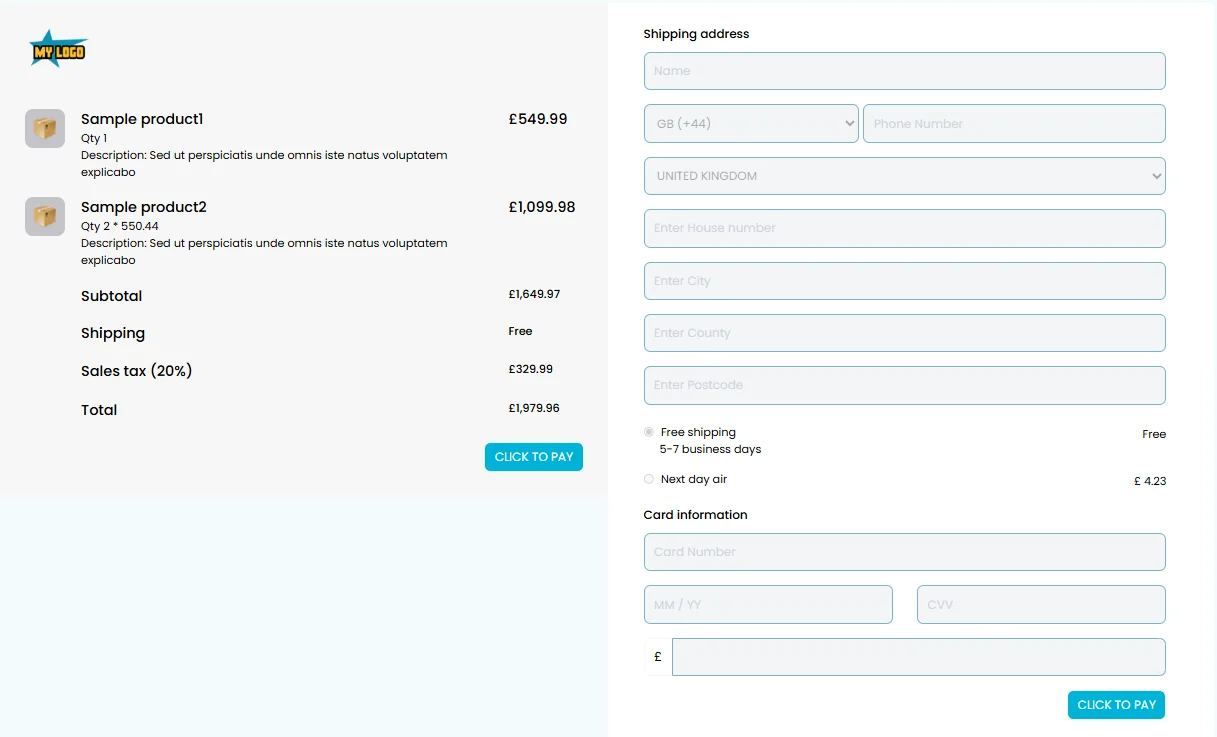
Each template has been designed to allow full point-and-click customisation of branding, available control functions (using on/off sliders) and custom tick boxes customers will interact with.

4 customisable templates available to suit your business needs.
Web checkout template 1 — customisable payment form design
Web checkout template 2 — customisable payment form design
Web checkout template 3 — customisable payment form design
Web checkout template 4 — customisable payment form design

Template Control Settings

Customise and control every field with simple on/off sliders
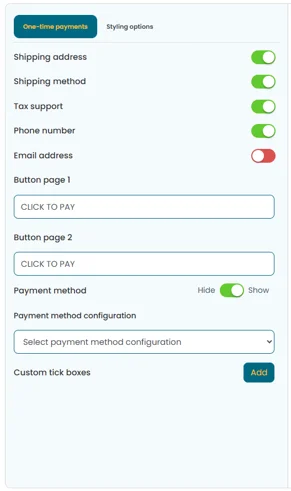
Checkout templates control panel showing on/off sliders for customising one-time payment form fields

Toggle fields on/off, configure required fields, and customise the customer experience with intuitive controls.

Complete Branding Control

Match your website design with full styling options
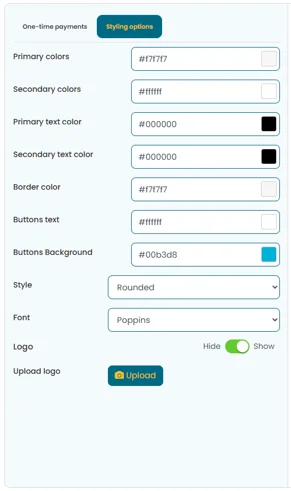
Checkout template styling controls showing colour schemes, fonts, logos, and branding customisation

Customise colours, fonts, logos, and every visual element to match your brand identity.

Complete Template Overview

See the control panel and live preview side-by-side
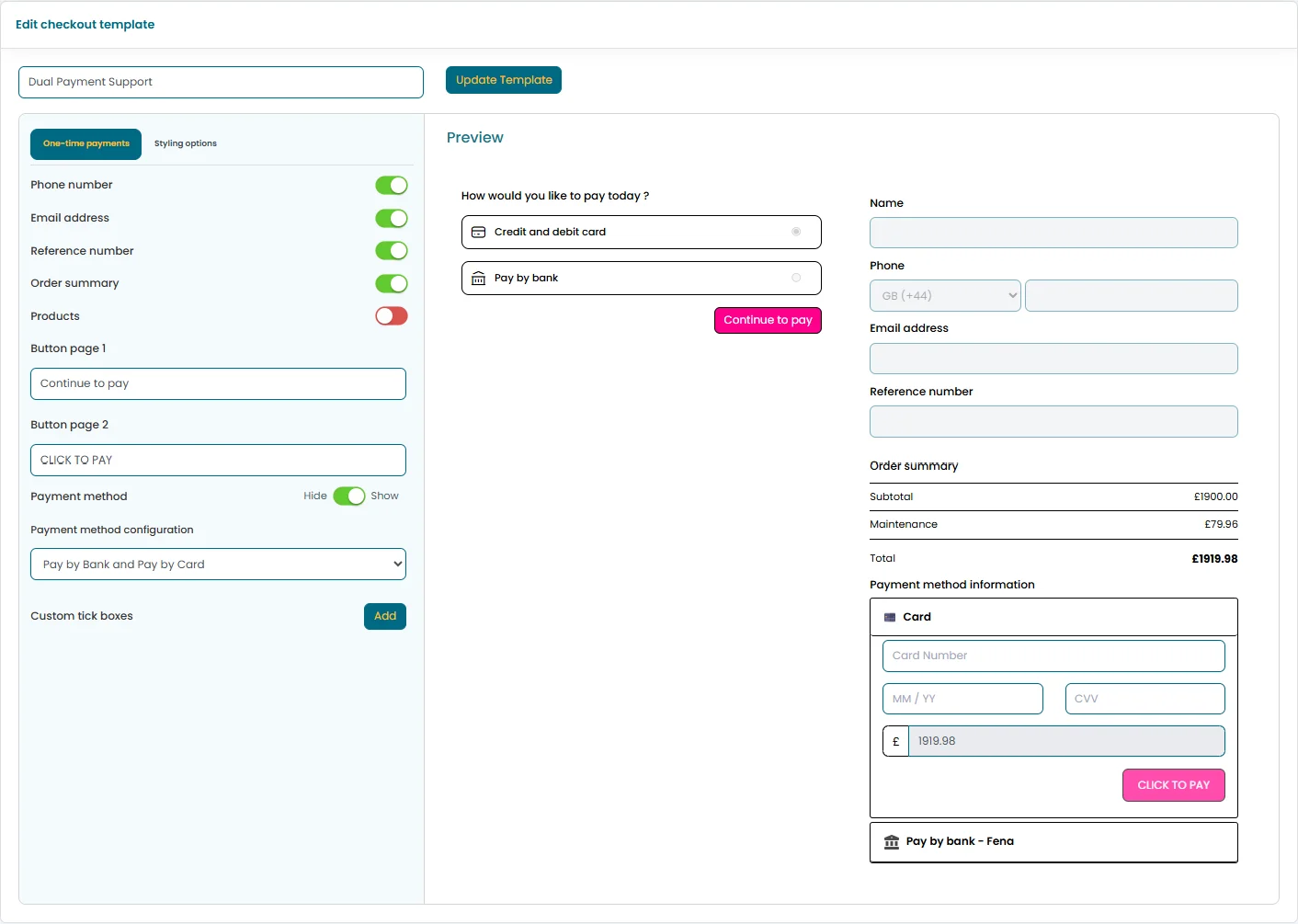
Full template view showing both the control panel and the live checkout form preview

Real-time preview of your checkout form as you customise — what you see is what your customers get.

Payment Routing

Payment type collections

Build payment type collections and map each payment type to the specific payment gateway you want transactions processed on. Complete control over payment routing and processing.

Payment type configuration showing gateway mapping and routing controls for different payment methods

Map different payment types to specific gateways and configure processing rules.

Card Payments

Route credit and debit card transactions to your preferred gateway with specific processing rules for each card type.

Digital Wallets

Configure Apple Pay, Google Pay, and other wallet providers with dedicated routing and processing rules.

Bank Transfers

Set up direct bank transfer options with specific gateway mappings for different transfer types and currencies.

Rules Engine

Advanced payment rules

Fully customisable payment rules that control which payment buttons are displayed on the web checkout form and what validation occurs before payments are sent to the payment gateway.

1

Choose Trigger Value

Choose trigger value for payment rules — select from pre-defined fields like amount or custom API values

Choose the trigger value that starts the rule. This can be pre-defined fields like amount or custom API values you create yourself and send as variables over the Checkout API.

2

Set Match Condition

Set match condition for payment rules — define the conditions that must be met

Set the match condition to the value you selected. Define the exact conditions that must be met for the rule to activate.

3

Decide Action

Define action for payment rules — decide what happens when conditions are met

Decide what happens with a Do setting. Control payment button visibility, validation behaviour, and gateway routing based on your conditions.

Manage Your Rules

Create as many rules as you need and manage them in list view.

Payment rules list view showing all configured rules and management controls

Complete Rule Interface

Create sophisticated rules for payment validation, amount limits, currency restrictions, and conditional payment method availability.

Advanced payment rules configuration interface showing conditional logic, validation rules, and payment button display controls

How payment links work

1

Create a secure payment link for your customer through the Paytia dashboard or user interface

2

Select to send the payment link out via email, SMS, or your preferred communication channel

3

Customer clicks the link and is taken to a secure, branded payment page

4

Payment is processed securely, with real-time notification of completion

Payment Request

Invoice #INV-2025

Amount Due:

£125.00

Pay Now

Secure payment processed by Paytia

Full

Branding control

Zero

Development needed

All

Payment methods

Level 1

PCI compliance

Overview

Customised web checkout experience

Paytia's customised web checkout enables businesses to create fully tailored payment experiences. Design custom checkout flows with your branding, custom fields, and seamless integration to enhance customer satisfaction and conversion rates.

With flexible customisation options and no complex integrations required, businesses can create unique checkout experiences that match their brand identity and business requirements. Every checkout page is fully PCI DSS Level 1 compliant, with card data captured in a secure Paytia-hosted iframe and sent directly to the payment gateway.

Point-and-Click Builder

No coding required. Our visual builder lets you design checkout pages by toggling settings, dragging elements, and previewing changes in real time. What you see is what your customers get.

Template Cloning

Create a checkout template once, then clone and adapt it for different products, campaigns, or client segments. Roll out new payment pages in minutes instead of days.

API Integration

For advanced use cases, the Checkout API lets you send custom variable data, trigger payment rules dynamically, and embed checkout forms directly into your applications.

Real-Time Reporting

Track payment status, completion rates, and revenue across all your checkout pages from a single dashboard. Export data for reconciliation and analysis.

FAQ

Frequently asked questions

What is a customised web checkout?
A customised web checkout is a fully branded payment form that businesses can customise with their logo, colours, fonts, and custom fields. It provides a seamless payment experience that matches your brand identity while maintaining PCI DSS compliance and security standards.
How customisable is the web checkout solution?
The web checkout solution offers extensive customisation options including branding (logos, colours, fonts), custom fields, form layouts, and styling. You can create a unique checkout experience that matches your brand identity and business requirements without complex integrations.
Is customised web checkout PCI DSS compliant?
Yes, all customised web checkout solutions are fully PCI DSS Level 1 compliant. Paytia handles all card data processing securely, ensuring that sensitive payment information never touches your systems.
Can I integrate with my existing payment gateway?
Yes, customised web checkout integrates with popular payment gateways including Stripe and other major providers. The solution works seamlessly with your existing payment infrastructure.
How does it improve conversion rates?
Customised web checkout improves conversion rates by providing a branded, trustworthy payment experience that matches your website design. Customers feel more confident completing payments when the checkout looks professional and consistent with your brand.
Can I customise the checkout flow?
Yes, you can customise the checkout flow including the number of steps, field order, validation rules, and user experience elements. Create a checkout process that matches your business needs and customer preferences.
How do I integrate it into my website?
Customised web checkout can be integrated through Paytia's API. Embed the checkout form directly into your website pages or use hosted payment pages, depending on your technical requirements.
What payment methods are supported?
Customised web checkout supports all major payment methods including credit cards, debit cards, and digital wallets. The specific methods available depend on your payment gateway configuration.
Industry Examples

Checkout solutions for every industry

Businesses across diverse industries use Paytia's customised web checkout to streamline payments and improve customer experience.

Councils and Government

Collect council tax payments, permit fees, and service charges through branded checkout pages with specific reference fields and payment validation.

Property Management

Process rent payments, deposit collections, and maintenance charges with tenant reference fields and recurring payment options.

Healthcare Providers

Collect patient payments, appointment deposits, and treatment plan instalments with medical reference numbers and data capture fields.

Legal and Accounting

Invoice clients for professional services with matter references, billing codes, and secure payment processing through branded forms.

Wholesale and Distribution

Process trade orders with customer account numbers, product codes, and shipping calculations built into the checkout flow.

Travel and Hospitality

Booking confirmations, deposit payments, and balance collections with travel reference numbers and customer detail capture.

Ready to create your branded checkout?

See how Paytia's customised web checkout can boost conversions with branded, secure payment pages.